An AI agent is only useful if it can work with the company’s systems: check whether a customer has a contract, find a free slot in the schedule, log a service request. Until recently, each of those connections was built by hand and for a single assistant. MCP is the standard that tries to make them once. Here’s what it is, the problem it solves, how it works inside, how it differs from an API and from RAG, and what risks it carries.
In short
- MCP stands for Model Context Protocol.
- It’s an open standard for connecting AI applications to software, data and tools.
- Each system connects once, through an MCP server, and any application that speaks MCP can use it.
- Since December 2025 it’s governed by a Linux Foundation foundation, with AWS, Google and Microsoft among its members.
- A connected tool can act, so the specification itself asks for a person who can deny each use.
What is MCP?
The official documentation defines it as an open-source standard for connecting AI applications to external systems: data sources like files or databases, tools like a search engine or a calculator, and workflows. And it explains it with a comparison: MCP is like a USB-C port for AI applications. Just as USB-C is a standard way to connect devices, MCP is a standard way to connect an AI to what it needs.
IBM describes it as a standardization layer for AI applications to communicate with external services, and notes that Anthropic introduced it in 2024 as an open standard. In December 2025 it moved to the Agentic AI Foundation, a new foundation under the Linux Foundation, so that a neutral party governs it. Its main members include Amazon Web Services, Google, Microsoft, OpenAI, Bloomberg and Cloudflare.
In the same announcement, the Linux Foundation spoke of more than 10,000 published MCP servers and said it’s used by Claude, ChatGPT, Microsoft Copilot, Gemini, Cursor and VS Code, among others. That’s what gives the USB-C comparison its meaning: a server built once works with all those assistants.
What problem does it solve?
Without a standard, every connection is custom work. IBM tells it with an example: an AI that has to use several services finds that each API asks for data in its own way, returns answers in a different structure and, when one changes a detail, the whole flow can break. And if the company has several assistants, the work multiplies: each needs its own connection to each system.
With MCP, the system connects once, through an MCP server that explains what can be done with it, and any application that speaks MCP understands it with no extra work. The specification acknowledges where the idea comes from: the Language Server Protocol, the standard that let any code editor understand any programming language without each editor having to do it on its own.
How does it work?
The specification distinguishes three roles. The host is the AI application, for example an agent or a chat. The client is the connector that lives inside the host and talks to a server. And the server is the program that offers something: the one that knows how to create a request in an ERP, read a calendar or search some documents. They talk to each other with messages in a standard format, JSON-RPC 2.0.
What a server offers can be of three kinds. Tools are functions the model can run, like logging a service request; they’re the ones that act. Resources are data to read, like a customer’s contract or a manual. And prompts are ready-made message templates for a specific job. The server can run on the same computer as the host or on another one, over the internet.
The most interesting part is how the agent finds out what it can do: it asks the server. This is an example in the specification’s format, shortened the same way as its own examples, of a server that offers a tool for logging service requests:
The agent asks which tools there are
{
  "jsonrpc": "2.0",
  "id": 1,
  "method": "tools/list"
}
The server answers
{
  "jsonrpc": "2.0",
  "id": 1,
  "result": {
    "resultType": "complete",
    "tools": [
      {
        "name": "create_service_request",
        "description": "Logs a breakdown service request in the company's system",
        "inputSchema": {
          "type": "object",
          "properties": {
            "address": { "type": "string" },
            "equipment": { "type": "string", "description": "Brand and model" },
            "symptom": { "type": "string" }
          },
          "required": ["address", "symptom"]
        }
      }
    ],
    "ttlMs": 300000,
    "cacheScope": "private"
  }
}
The agent uses it during a conversation
{
  "jsonrpc": "2.0",
  "id": 2,
  "method": "tools/call",
  "params": {
    "name": "create_service_request",
    "arguments": {
      "address": "12 Main Street",
      "equipment": "Wall-hung gas boiler",
      "symptom": "Won't fire and shows an error code"
    }
  }
}
The name, the description and the list of data the tool asks for are what the model reads to decide when to use it and what to fill in. Microsoft’s documentation for connecting an MCP server to a Copilot Studio agent says it this way: write a brief but clear description of what the server does, because the agent uses it to decide whether to call it. An ambiguous description is a tool that gets used when it shouldn’t.
MCP, API or RAG?
MCP doesn’t replace a system’s API. The API is the door the system has so other software can read or write in it; the MCP server sits on top and explains it in a way any AI application understands. If the ERP has no API or other way in, MCP doesn’t create one. As IBM puts it, MCP isn’t an agent framework, but a standardized integration layer for agents to access tools.
Something similar happens with RAG: they don’t compete. RAG is searching the documents for what’s needed to answer and giving it to the model; MCP is a way to connect the search. An MCP server can offer that search as a tool, or the documents as resources, and the agent uses them like any other.
What are the risks?
The same as letting a program act on someone’s behalf, multiplied by how easy it is to connect things. The specification says so in its security section: MCP enables data access and code execution, which is why it asks that users consent to every access and every operation, keep control over what is shared and what is done, and that the host get explicit permission before using any tool. On the tools page it’s even clearer:
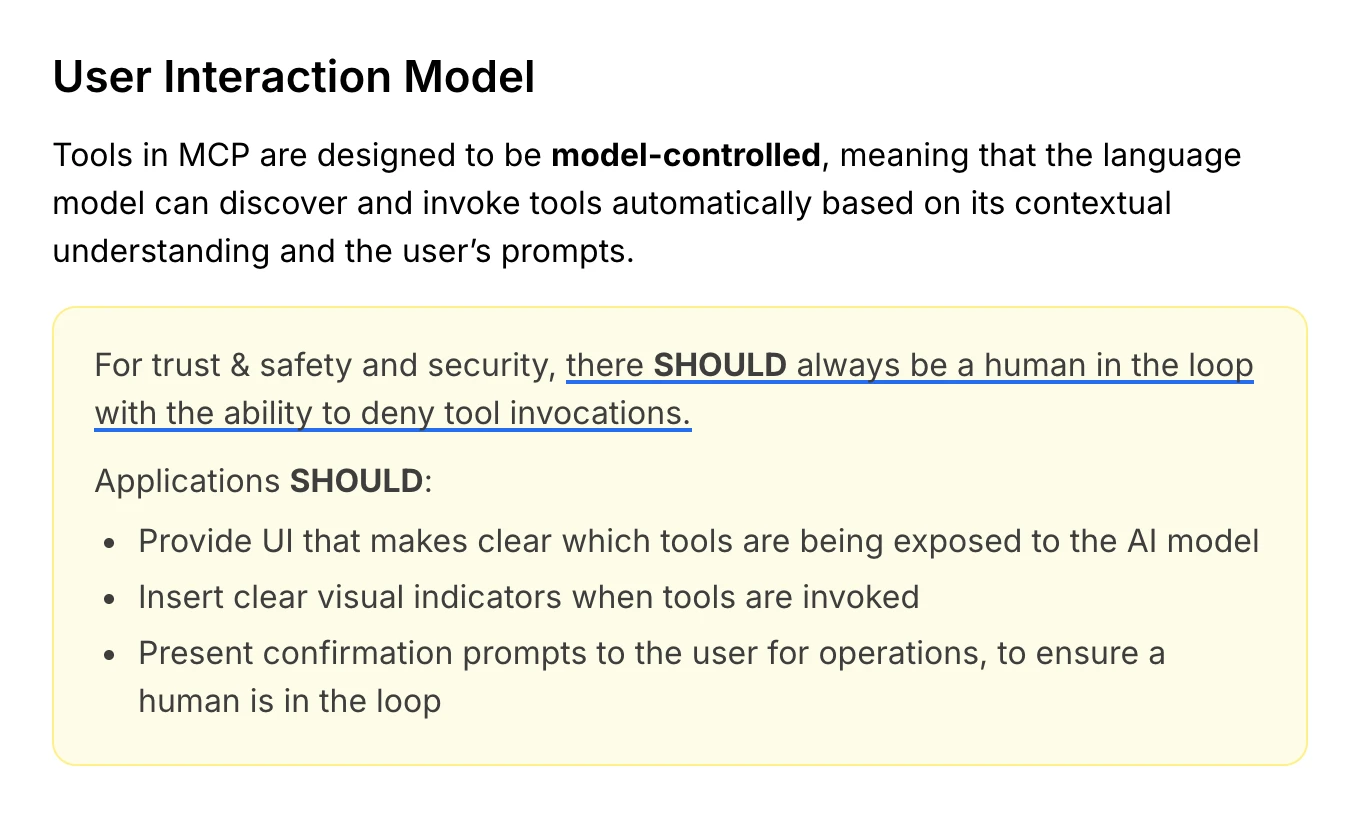
In a field service company, that means deciding, for each tool, whether the agent uses it on its own or with approval. Checking whether a customer has a contract does no harm; creating a work order, changing an appointment or sending a quote does, if it goes wrong. It’s the same logic as human in the loop, applied to each connection.
What changes for a field service company?
For an agent to use MCP with your management software, someone has to have built an MCP server for it: the vendor, a third party or whoever sets up your agent, on top of the software’s API. Where one exists, connecting a new assistant is much faster. Where it doesn’t, the connection has to be built anyway, with or without MCP; the standard changes how the connection is described, not whether the software lets you in.
So the useful question before choosing an agent isn’t whether it uses MCP, but what it can read and write in your system and who approves each thing. At Delegic, we build the connection to each company’s system ourselves, with whatever that system allows, and every action that writes something goes through the permissions the company decides.
Frequently asked questions
What does MCP stand for?
Model Context Protocol: a standard for giving AI models the context and tools they need.
Who created MCP?
Anthropic introduced it in 2024 as an open standard. Since December 2025 it has been governed by the Agentic AI Foundation, part of the Linux Foundation.
What is an MCP server?
The program that offers something to AI applications through MCP: tools that can be run, data that can be read or prompt templates. Each system you want to connect, an ERP, a calendar or a search engine, needs its own.
Is MCP free?
The standard is open and open-source, so using it costs nothing. What may cost money is the service behind each server, or the work of building one for software that doesn’t have it.
Related terms
- AI agent: the program that uses the tools.
- Tools: the actions an agent can take.
- API: a system’s door, on which an MCP server is built.
- RAG: searching the documents before answering.
- Human in the loop: a person who approves what can’t be undone.